
 Home
HomeHow To List Your GoE Qualifications and Workplace On Facebook

We're delighted to announce that you can now list your GoE qualifications on your Facebook profile. GoE Trainers and Practitioners may also now add The GoE as their work place.
We know that many members use Facebook as part of their social online marketing strategy, so listing your qualifications and work place is a good way to build trust between yourself and your potential clients.
How To Add Your GoE Qualification
- Go to the Facebook.com website and either create a free account, or login using your existing account.
- Go to your Facebook profile by clicking your name on the top menu bar.
- On your profile, click 'About' then 'Work and education' then 'Add a university'.
- Here you'll be able to search for "The Guild of Energists" and say in the "description" or "concentrations" fields which qualifications you have achieved or are currently studying.
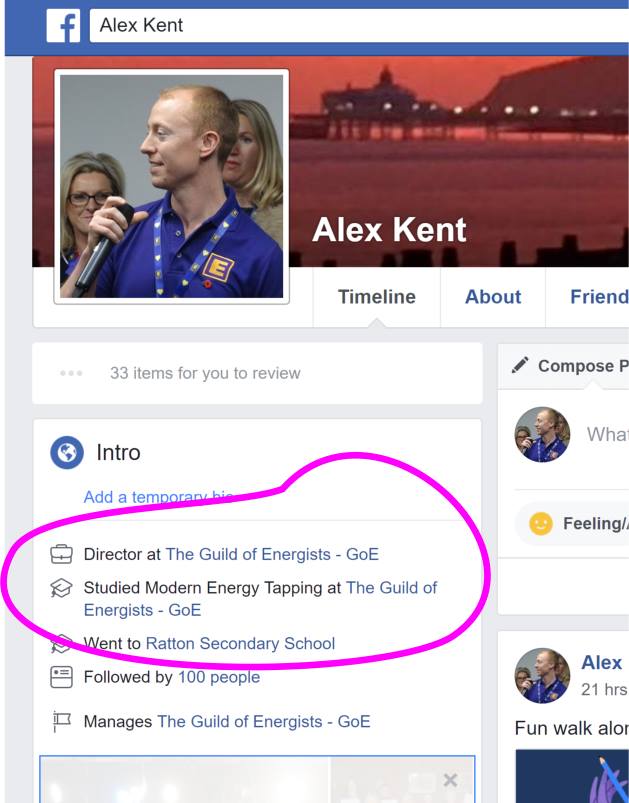
That's it - your Facebook profile will now list your qualifications! See below for how it looks.
If you're currently studying GoE qualifications by distance learning then you can also list them. Just leave the 'graduated' checkbox unticked.
How To Add The GoE As Your Workplace
- Go to the Facebook.com website and either create a free account, or login using your existing account.
- Go to your Facebook profile by clicking your name on the top menu bar.
- On your profile, click 'About' then 'Work and education' then 'Add a workplace'.
- Here you'll be able to search for "The Guild of Energists" and say in the "job title" field something like:
- Energist
- Coach
- Dating Coach
- Practitioner
- Modern Energy Trainer
That's it - your Facebook profile will now list the GoE as your workplace! See below for how it looks.
Need further help?
Ask a question in the GoE Member Support Group here:
How It Should Look
 Do you love ENERGY? Do you love working with energy, playing with energy, talking about energy and discovering more about Modern Energy?
The GoE is the place to be for Modern energists.

Find out what's on where, who's doing what in energy tapping & Modern Energy. Get special offers & the latest information on special events, workshops and certification courses.